SELF-HOSTED WATCH HISTORY

The local brain for your
media stack.
Keep Plex, Emby, and Jellyfin in sync from one private watch-history archive. Plekt preserves watched status, playback progress, and rewatches, ready to restore after a library rebuild.
Public demo login: demo / demo · actions are simulated and nothing is saved.
THE DASHBOARD
Your whole media stack, at a glance.
See what is playing, what is next, and what you watched across Plex, Emby, and Jellyfin, all in one private dashboard.
Explore the dashboard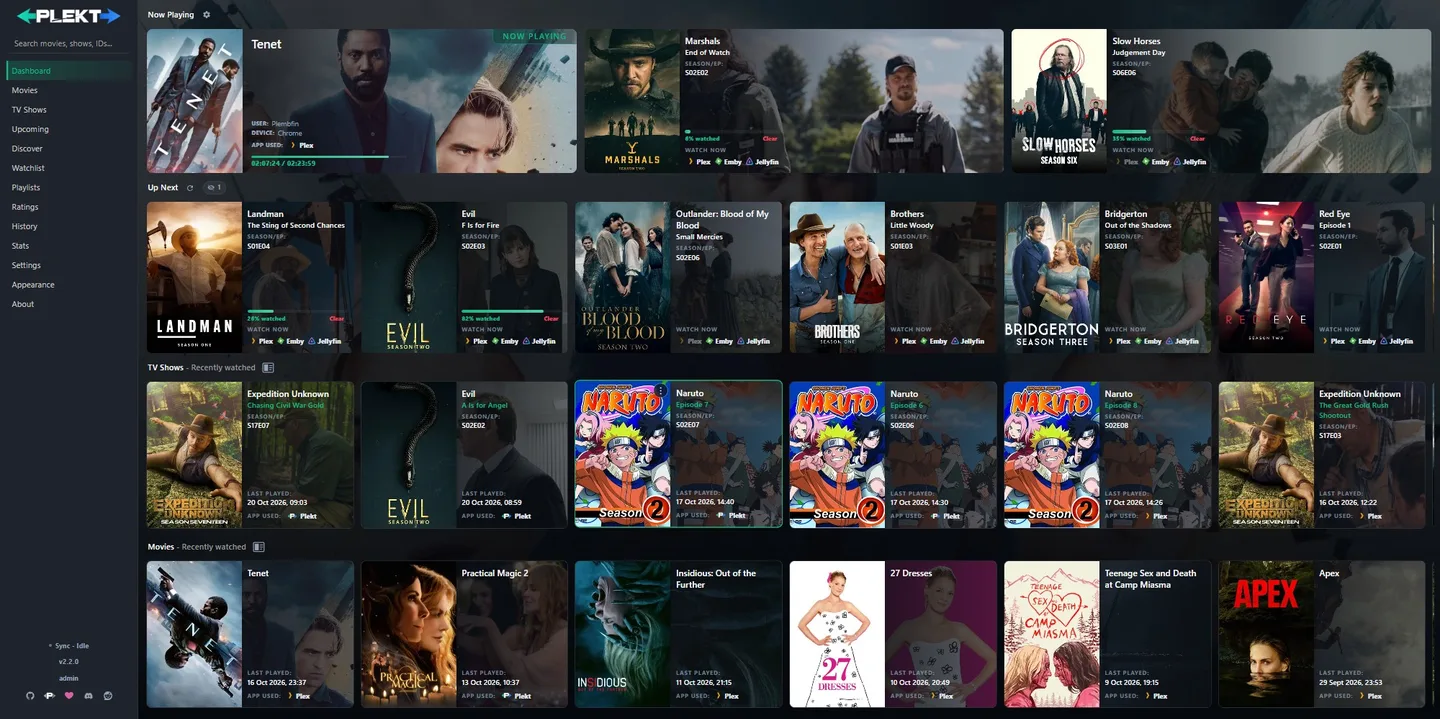
DOCKER QUICK START
Running in five minutes
Start Plekt with Docker Compose, then finish connecting your media servers in Guided Setup.
services:
  plekt:
    image: ghcr.io/lasikiewicz/plekt:latest
    container_name: plekt
    ports:
      - "5056:5055"
    volumes:
      # Database, cached artwork and generated config live here. Keep this folder.
      - ./data:/data
    environment:
      # Host port Plekt is published on.
      PLEKT_PUBLISHED_PORT: "5056"
      # Dashboard login. Set ADMIN_PASSWORD in the .env file beside this file.
      ADMIN_USERNAME: admin
      ADMIN_PASSWORD: "${ADMIN_PASSWORD:?Set ADMIN_PASSWORD in .env before starting}"
    restart: unless-stopped
START PLEKT
echo "ADMIN_PASSWORD=change-me" > .envdocker compose up -d
Then open http://localhost:5056.
Read the setup guidePICK THE RIGHT FIT
How does Plekt compare?
Different tools solve different parts of media tracking and sync.
| Capability | Plekt | Yamtrack | Floppy | PlexTraktSync | WatchState | CrossWatch | JellyPlex-Watched |
|---|---|---|---|---|---|---|---|
| Self-hosted | ✓ | ✓ | ✓ | ✓ | ✓ | ✓ | ✓ |
| Quick easy setup | ✓ | ✓ | ✓ | ✓ | |||
| Connects to Plex | ✓ | ✓ | ✓ | ✓ | ✓ | ✓ | ✓ |
| Connects to Emby | ✓ | ✓ | ✓ | ✓ | ✓ | ✓ | |
| Connects to Jellyfin | ✓ | ✓ | ✓ | ✓ | ✓ | ✓ | |
| Syncs watch state across media servers | ✓ | ✓ | ✓ | ✓ | |||
| Syncs resume progress across media servers | ✓ | ✓ | ✓ | ✓ | |||
| Connects to or imports from Trakt | ✓ | ✓ | ✓ | ✓ | ✓ | ||
| Tracks books, games, or other media | ✓ | ✓ | |||||
| Includes personal history or stats | ✓ | ✓ | ✓ | ✓ | |||
| Snapshot-based rollback of watch state | ✓ | ✓ | |||||
| Restores watch state to rebuilt libraries | ✓ | ✓ | ✓ | ||||
| Up Next queue for movies and episodes | ✓ | ||||||
| Discover rails and requests through Seerr | ✓ | ✓ | |||||
| Single process, one SQLite file | ✓ |
* Ticks mark each app’s documented core capabilities, accurate as of 5 November 2026. Other projects release updates often, so check their documentation for the latest.
UP NEXT
Pick up right where you left off.
Bring in-progress films and episodes from your servers into one queue. Check resume progress, jump to the right player, or restore anything you dismissed.
Explore the Up Next queue
PLAYLISTS
One playlist. Every server.
Create hand-picked playlists or set rules to build them for you. Plekt keeps them in sync across Plex, Emby, and Jellyfin, with automatic playlists refreshing hourly.
Explore playlists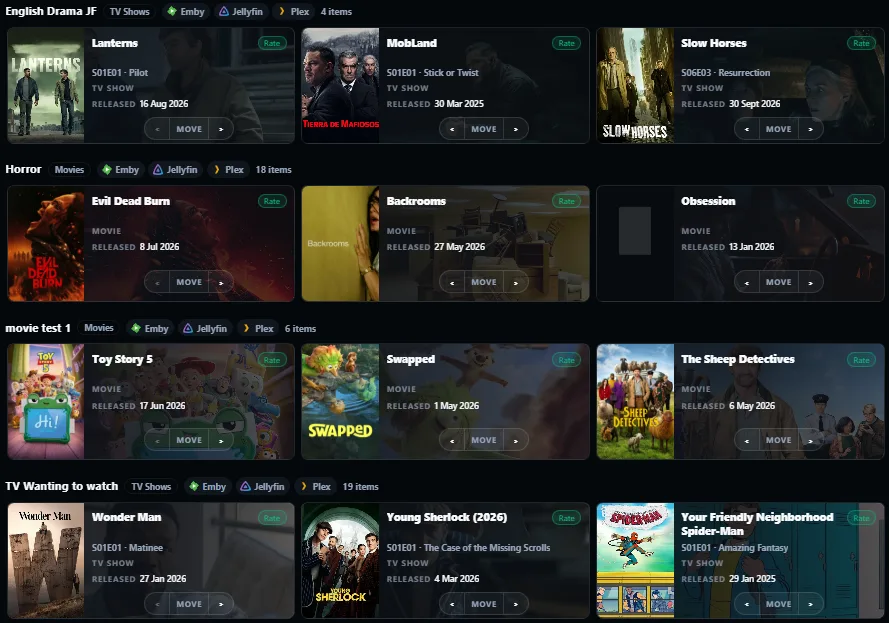
THE LOOP
Track it. Remember it. Sync it back.
Every play is tracked, saved, and synced.
Your watch history survives library rebuilds, server moves, and outages. Local and remote backups keep it protected.
MORE THAN SYNC
It is also the app you browse.
Posters, cast, air dates, and viewing stats.
BUILT AROUND YOUR STACK
Everything talks to Plekt.
Watch state syncs across your servers and Trakt. Metadata and request tools connect through Plekt.
 Plex
 Emby
 Jellyfin
 Trakt
