
The Dashboard separates three kinds of information that are easy to confuse: what is playing now, what is ready to continue next, and completed watch history.
The Up Next queue can contain both movies and TV episodes. Resume progress is part of that queue; it is not a separate history rail.
The sections are independent, so the same title can appear in live playback, Up Next, and the durable archive when each state is valid.
Page structure
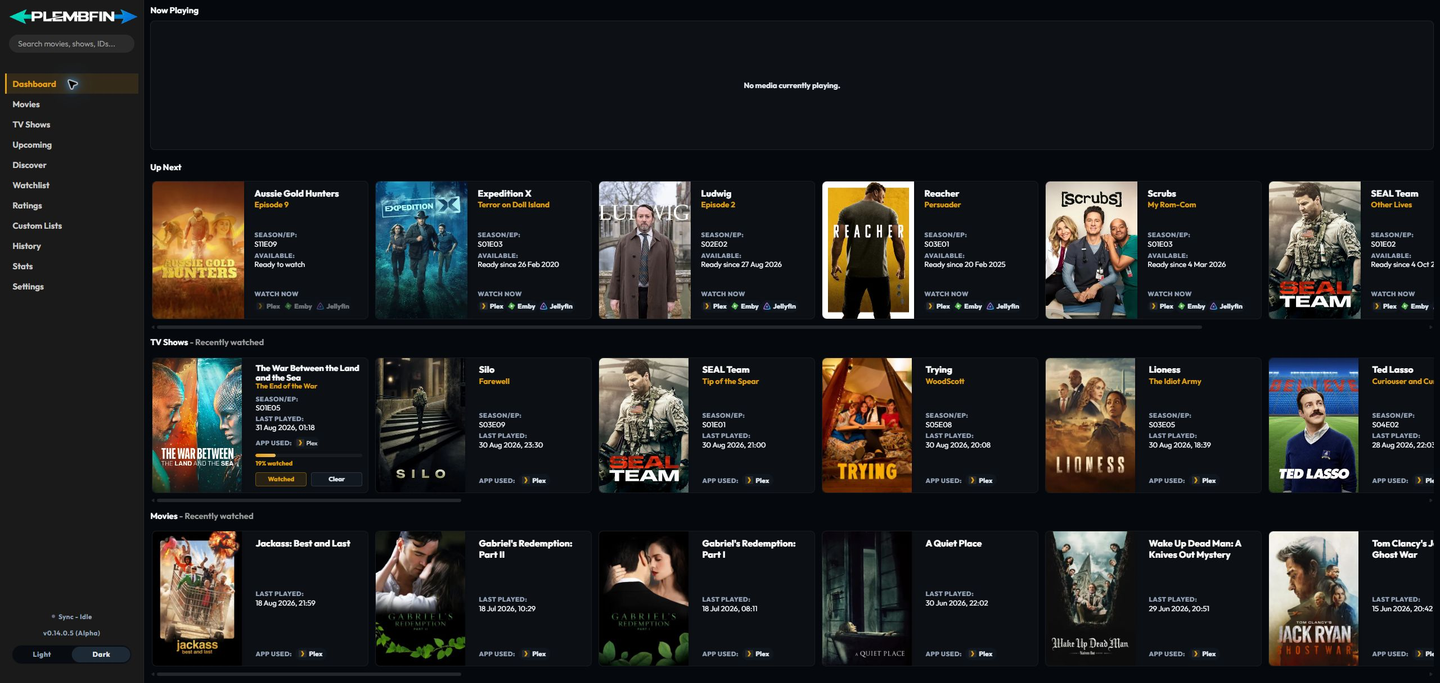
The sidebar opens the main pages.
The Dashboard content is arranged in this order:
- Now Playing for active media-server sessions.
- Up Next for movie and TV continuation items, including saved resume progress and released episodes selected from tracked shows.
- TV Shows – Recently watched for recent completed TV watches.
- Movies – Recently watched for recent completed movie watches.
If there is no saved resume progress or next-up item, Up Next is omitted. The sidebar Sync indicator is a shortcut to Sync Activity.
Dashboard history uses Card View by default. The Dashboard has no separate Appearance layout control.
Now Playing
Now Playing is session information, not completed watch history.
It can show the title, season and episode, source service, current position, duration, and a progress bar for active sessions reported by Plex, Emby, or Jellyfin.

To use it:
- Start or resume a title in a connected media server.
- Return to the Dashboard while playback is active.
- Check the source badge, position, and duration.
- Select the title to open its media details when you need more actions.
Plembfin refreshes active sessions independently of the normal scheduled sync: the poll is more frequent while something is playing, and opening the Dashboard or returning to a background tab requests a fresh snapshot immediately.
A provider failure is kept separate from a genuinely empty session result, so a temporary connection problem does not falsely report that playback stopped. Disappearing from Now Playing does not, by itself, create a completed watch.
Completed playback and sessions beyond the active-session window are removed from Now Playing, so stale cards do not linger after playback stops.
If a session never appears, follow Now Playing is empty or stale.
Up Next
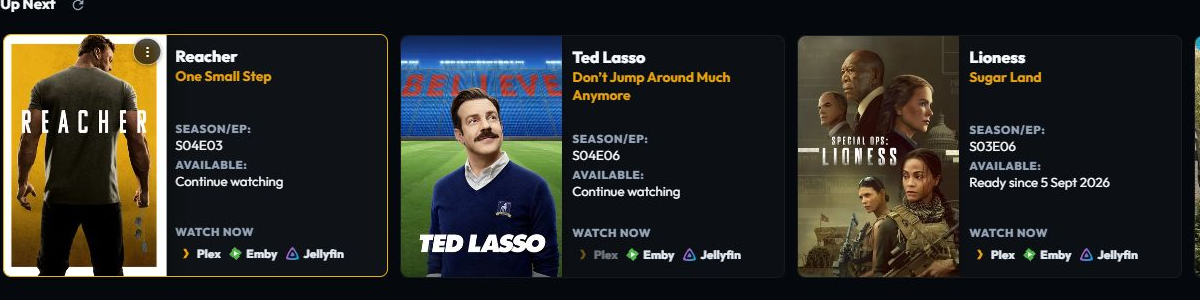
Up Next is the dashboard’s mixed continuation rail. It combines actionable resume records for movies and episodes with released next up episodes from tracked shows. Resume cards are ordered by their latest progress update; next-up cards follow with deterministic show, season, and episode ordering.
Each card can show its real episode name, season and episode code, air-date context, resume state, and the media servers where it is available. Watch Now links open a matching item in Plex, Emby, or Jellyfin when a connected server can provide one. A cached local resume card remains useful without a provider connection.
Use Sync Up Next to refresh connected media-app availability. If a provider feed fails, Plembfin keeps the last good observation and shows a compact source-status message instead of deleting the queue. The builder deduplicates matching resume and next-up observations and does not merge a re-release or reboot from a different year.
Use the card’s More options menu for Mark Watched, Rate, Add to watch list, Clear Progress when resume exists, or Remove from Up Next. Removing a card updates the local rail immediately and attempts to clear the connected-app resume state through the provider endpoint when that target is available. Marking watched commits locally first and then dispatches through the normal sync path.
Resume progress lives in Up Next. A resume card appears while its progress has not crossed the configured watched threshold and keeps the actions needed to decide what happens next:
- Watch Now or Resume opens the title so playback can continue in the connected media service.
- Clear Progress removes the resume marker without marking the title watched.
- Mark Watched records a completed watch and sends it through the normal sync path.
The card’s More options menu also exposes the personal rating, watchlist, and removal actions.
The watched threshold and minimum resume position are controlled by Sync Tuning.
Changing those values affects how future playback is interpreted. For an incorrect percentage, follow Up Next resume progress is missing or wrong.
TV and movie history
The bottom rows are the recent durable completed-watch archive.
They are not a list of active files on a media server.
A title appears after Plembfin has recorded a watch event.
- The TV Shows row groups recent episode activity by show.
- The Movies row lists recent movie watch activity.
- A rewatch remains a separate event in History while the library card remains one title.
- Selecting a poster opens the media detail page.
An item can appear in Up Next with resume progress and also in completed history when it has a previous watch.
Dashboard history cards
Dashboard TV and movie history rows always use Card View. Each card combines the poster, title, watch information, and state in a compact layout.
The Dashboard view is fixed; use the Movies media page or TV Shows media page for library-specific poster, list, and overview controls. Appearance is available on those media detail pages for optional content sections.
A useful daily check
After a watch or a manual correction, read the Dashboard first.
Then open the newest row in Sync Activity if a destination needs an explanation.
The Dashboard is the summary.
Sync Activity is the evidence for each destination.