
Up Next is the Dashboard’s continuation rail. It combines actionable resume records for movies and episodes with released next up episodes from tracked shows. Resume progress lives here; it is not a separate history rail.
Works on
| App | Rail Plekt updates | Removing a card | Notes |
|---|---|---|---|
| Plex | Continue Watching | Plekt hides the matching item. | Plex lists the next episode with no position, so it appears as a next-up card. |
| Emby | Continue Watching (Resume) | Plekt hides the matching item. | |
| Jellyfin | Next Up | Not possible. | Next Up holds one episode per show and no movies. Plekt keeps its own queue authoritative while Jellyfin catches up. |
| Trakt, Simkl | Not applicable | Not applicable | They are not part of the queue. |
Why it differs. These rails are calculated by each app, so Plekt cannot hand an app an arbitrary item. For a ready episode it restamps the episode watched just before it, and the app works out the rest. Jellyfin’s Next Up is a read-only feed with no per-item removal, which is why a removed or dropped title can linger there. In every app the push only adds, so it never hides something that is missing from Plekt’s queue.

How the queue is built
- Resume cards are ordered by their latest progress update. Next-up cards follow in show, season, and episode order.
- Each show appears once. A part-watched episode with a known position replaces that show’s next-up card, and of several part-watched episodes the most recently updated one is kept.
- The episode or movie playing right now moves to the top while it plays.
- Shows that share a title but have different TMDB or TVDB ids stay separate cards, and a re-release or reboot from a different year is not merged.
- When your latest play is behind the furthest episode you have watched, the episode after it gets its own card beside the show’s ordinary next episode. See Rewatch tracking.
Each card shows the episode name, its season and episode code, and Watch Now links that open a matching item in Plex, Emby, or Jellyfin when a connected server can provide one. A cached local resume card stays useful without a provider connection.
Reloads and rebuilds
After a page reload, Plekt paints the last Up Next cards your browser remembers (up to 30 cards, kept for up to 14 days) while it checks for changes, and the server’s answer then replaces them. Only cards the server had confirmed are remembered, never a save or removal still in progress.
The server reuses shared snapshots and saved library answers, so one queue change causes fewer rebuilds, and pages stay responsive while tracker polls, cache warm-ups, and rebuilds run.
Card actions
Use a card’s More options menu for Mark Watched, Rate, Add to watch list, Clear Progress (when resume exists), Remove from Up Next, and Drop. Mark Watched commits locally first and then goes out through the normal sync path.
What each app receives
When Sync Up Next to media apps is on in Settings → Sync → Sync tuning (it is by default), Plekt queues one background push whenever the queue changes, even with the Dashboard closed. Use Sync Up Next for an immediate push.
The Works on table shows the rail each app uses. For a ready episode, Plekt checks that it is unwatched, released, and follows a fully watched run. It then refreshes the app’s calculated rail from the watched episode just before it. Genuine part-watches in an app are never overwritten.
The push only adds. An item that an app lists but Plekt’s queue does not is left in place and reported as an app-only item. An item leaves an app’s rail only when you clear its progress or remove it in Plekt, so stale entries you never touched can stay on a rail until the app drops them or you remove them. To take a whole title out of the queue everywhere, use Drop.
When an app echoes Plekt’s own push back, the automatic push does not send the same queue to your providers a second time.
If an app does not answer, Plekt skips it, keeps its last good observation, and queues a new push as soon as it answers again. Turning the setting off leaves those app lists unchanged while Plekt’s own Up Next stays available.
Remove and restore
Remove from Up Next hides the card at once, clears its local resume progress, marks it unwatched, and records the removal on the server, so it applies on every device. For a show set to a non-Aired episode order, Plekt first checks that it can identify the episode in every place the change must reach, and refuses rather than changing the wrong one. When a show has two cards because of a rewatch, Plekt asks whether to hide only that card’s season or the whole show.
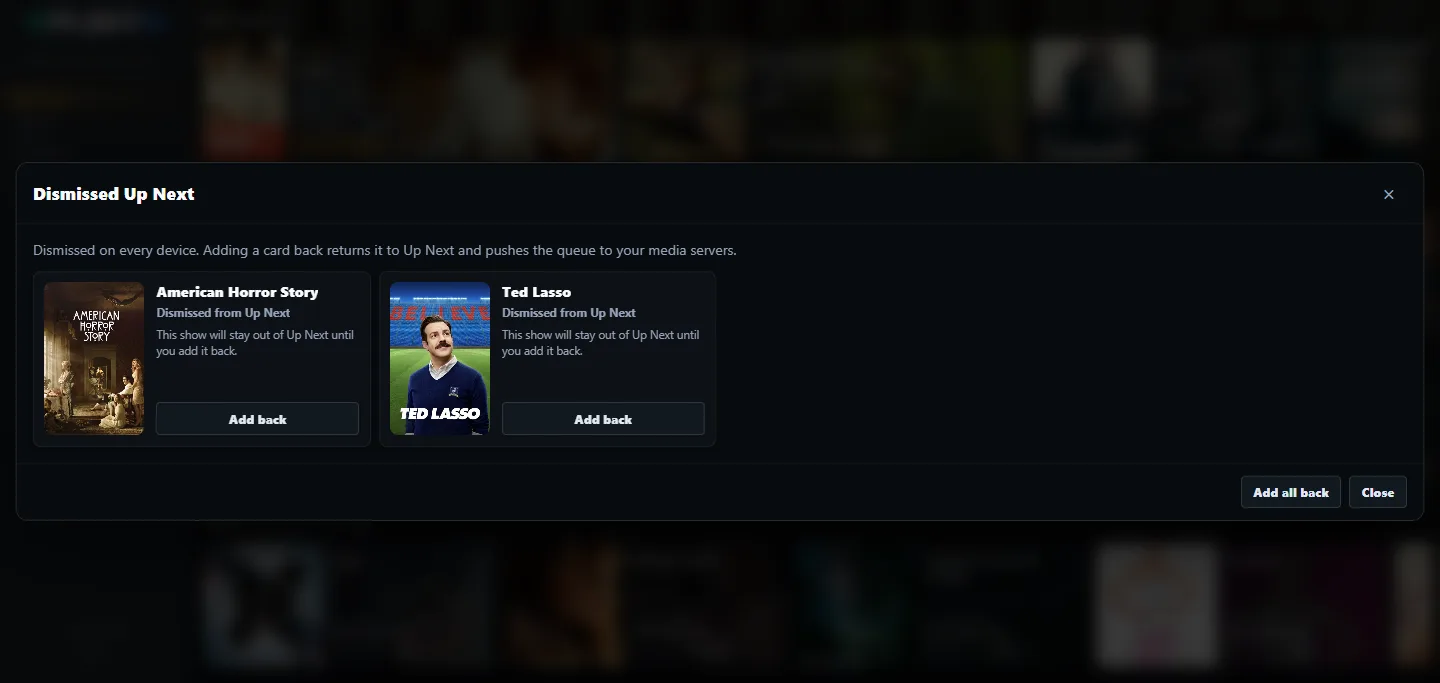
When items are removed, the count button beside the Up Next heading opens Dismissed Up Next. Choose Add back for one item or Add all back to restore cards. Plekt then pushes the restored queue to the connected apps. A removal is a “not now” choice, not a permanent delete: the item can return after newer genuine playback progress is recorded.
Resume progress appears while it has not crossed the watched threshold. The threshold and the minimum resume position are set in Sync tuning. For a wrong percentage, follow Up Next resume progress is missing or wrong.